
From today, Wooma Vision can document an entire room in one sweep. Take a handful of general photos, and it identifies every item in shot and writes the description for you, without needing to photograph, analyse and repeat one item at a time.
This is Wooma Vision 2.0, the latest version of the AI image scanning technology behind Wooma's inventory reports.
Where this started
Wooma Vision 1.0 launched in July, and it did one thing very well: point it at a single item, and it would write a detailed, accurate description without anyone needing to type a word. For an industry used to spending hours compiling inventory reports by hand, or paying a third party to do it, that was already a significant shift.
The numbers backed that up. Vision 1.0 is now used by more than 250 users, has processed thousands of images, and holds a 98% accuracy rate on description quality. Each image is analysed in 0.86 seconds on average.
What we learned
Good results on individual items didn't tell the whole story. Users told us that getting through a whole room still felt like a lot of steps: navigate to an item, take a photo, wait for the analysis, move to the next item, repeat. Accurate, but not yet the step change from an hours-long process to a minutes-long one we were aiming for.
That's the gap Vision 2.0 closes.
What's new in 2.0
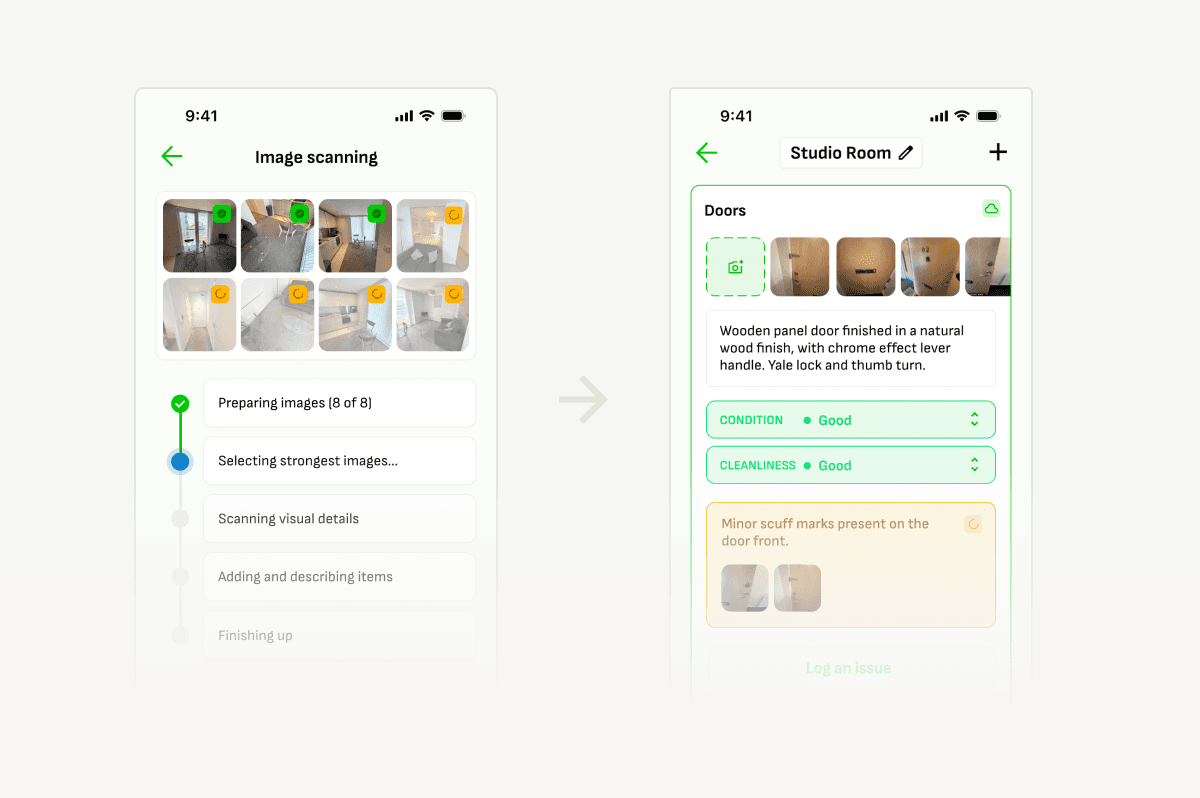
Instead of one photo per item, Vision 2.0 works from general photos of a whole room. Point your camera at the space the way you naturally would, take a few shots, and Vision identifies every distinct item across those images, describing and assessing each one individually, in a single pass.
A ten-minute, item-by-item routine per room becomes a couple of photos and a wait measured in seconds.
How it works
- Open the room you want to document in Wooma.
- Take a few general photos that cover the space. There's no need to isolate individual items.
- Vision scans the photos and identifies every item it can see across them.
- It generates a description, condition, and cleanliness assessment for each item automatically.
- Review the results, add anything Vision has missed, and move on to the next room.
For anyone curious about the mechanics: the shift from 1.0 to 2.0 comes down to recognising and separating multiple items within a single wider shot, rather than only handling one clearly framed item at a time. That's the part of the process that used to require the most manual navigation, and it's now handled automatically.
Same speed, more output
Despite generating a full room's worth of descriptions instead of one item at a time, Vision 2.0 is running at speeds comparable to 1.0 in testing. You're not trading speed for the extra capability. You get the same responsiveness, with a lot more done in each pass.
We're on track to double our portfolio in the next two years, and Wooma is letting us do that without scaling payroll to match. Working with them has been a no-brainer.
Mark Dempsey
Managing Director, MWD Residential Lettings
What this means day to day
For property managers and inventory clerks, the practical effect is time. What used to take the better part of an hour per property can now take a fraction of that, with the same consistency and detail whoever's holding the camera. That's time back for the parts of the job that still need a person: reviewing what Vision has produced, catching anything it's missed, and dealing with tenants and landlords directly, rather than typing up descriptions room by room.
AI is becoming a bigger part of daily life every year. It's great to see a company like Wooma bringing that technology into the property sector in a way that's genuinely easy to use, effective, and already driving real ROI with tools like Vision 2.0.
Harry Williams
Automation & Systems Analyst, Rettie
Availability
Wooma Vision 2.0 is live today on iOS, Android and web, and it's included in all Wooma plans. There's nothing to turn on or configure. It's simply how Vision now works.
If you run into anything or have feedback, support@wooma.com is the fastest way to reach us.
What's next
Work is already underway on Vision 3.0, which will extend this same single-pass analysis to identifying and logging issues, not just describing items. The goal is a single step that covers a full room description and any issues found within it, at once. The extended functionality is expected to reach customers within the coming weeks, following several rounds of testing to confirm its accuracy and reliability ahead of a full rollout.